
You can redeem a coupon code either directly in-game or through the official coupon redemption webpage.
■ How to redeem a coupon (in-game)
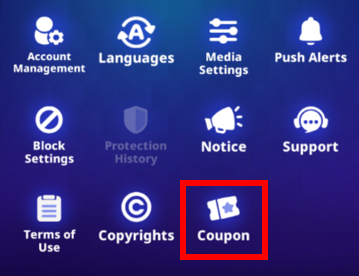
- Log in to the game → Tap your profile icon (top left) → Go to Settings → Select Coupon
* The in-game coupon redemption feature is not available on iOS devices.
■ How to redeem a coupon (webpage)
- Visit the Coupon Redemption Page → Enter your Game ID to log in → Input your Coupon Code
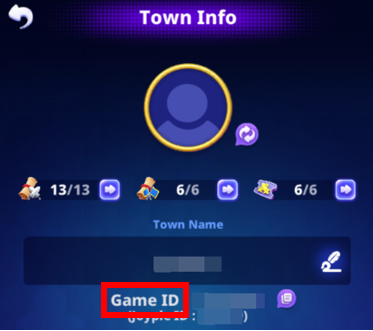
* To find your Game ID: Log in to the game → Tap your profile icon (top left) → Go to Town Info
- Rewards for redeemed coupons will be sent via in-game mail.
- Please refer to the coupon-related notice and make sure to redeem it within the validity period.
- It may take some time for the rewards to be delivered after coupon redemption.
- Each coupon code can only be redeemed once per account.
- Coupons that have already been used or have expired cannot be redeemed.
- If you enter an incorrect Game ID on the Coupon Page, the reward will not be delivered.